安装Kubernetes
首先安装Kubernetes cli tool Kubectl,它允许开发者通过命令后管理Kubernetes的资源。
*Mac可以使用Homebrew安装
1 | yihui.li@yihuilideMBP hello_docker % |
根据官方步骤安装Kind,它是一个命令行工具,使用非常简单。
开始创建K8s
将以下内容保存为 config.yaml:
1 | kind: Cluster |
执行 kind create 命令,创建 K8s 集群:
1 | yihui.li@yihuilideMBP k8sdemo % kind create cluster --config config.yaml |
检查K8s集群状态
1 | yihui.li@yihuilideMBP k8sdemo % kubectl cluster-info |
既然已经有了Dokcer,为什么需要K8s?
试想一下,如果你需要同时启动 10 个不同的容器镜像,需要运行 10 次 docker run 命令。
此外,如果容器之间有依赖顺序,还需要额外记住这 10 条命令特定的启动顺序。
K8s 的独特之处在于,它为我们抽象了诸如“启动 10 个容器镜像”这样的过程式的命令,你只需要向 K8s 描述“我需要 10 个容器”。10 个容器是我期望的最终状态,我不管怎么执行命令,执行了多少次命令等过程,我想要的就是这个结果。
用来向 K8s 描述“期望最终状态”的文件,就叫做 K8s Manifest,也可以称之为清单文件。Manifest 就好比餐厅的菜单,你只管点菜,做菜的过程我不管。
部署容器镜像
通过Kubectl与K8s集群交互
Kubectl 是一个与 K8s 集群交互的工具,通过 Kubectl,我们可以非常方便地以 Manifest 为媒介操作 K8s 集群的对象。就像操作数据库一样,我们可以对 Manifest 所描述的对象进行创建、删除、修改、查找等操作
编写Manifest,将容器镜像部署到K8s集群
将下面的内容保存为 flask-pod.yaml:
1 | apiVersion: v1 |
Manifest关键字解释:
- Kind,表示 K8s 的工作负载类型。在 K8s 中,我们不能像 Docker 一样直接运行一个容器镜像,镜像需要依赖于 K8s 更上层的封装方式运行,这种封装方式也就是工作负载,Pod 是工作负载的一种类型。在实际的项目中,我们一般不会直接创建 Pod 类型的工作负载。Pod是K8s调度的最小单位。
- Containers,表示 Pod 要运行的容器配置,例如名称、镜像和端口等。它是一个数组类型,这意味着我们可以在一个 Pod 里面配置多个容器
- Image,表示要运行的容器镜像
- Ports,表示容器要暴露的端口,相当于 docker run 的 p 参数
执行kubectl apply应用这段Manifest:
1 | yihui.li@yihuilideMBP k8sdemo % |
如果成功看到输出内容 pod/hello-world-flask created,说明我们已经把这段 Manifest 提交到集群里了。参数 -f 表示“指定一个 Manifest 文件”。
也就是说,当我们想要向 K8s 提交 Manifest 的时候,只需要记住一条命令,那就是 kubectl apply。
查看和访问Pod
要查看 K8s 集群正在运行中的 Pod,可以使用 kubectl get pods :
1 | yihui.li@yihuilideMBP k8sdemo % kubectl get pods |
要在本地访问集群内的 Pod,我们可以使用 kubectl port-forward 命令进行端口转发操作,打通容器和本地网络:
1 | yihui.li@yihuilideMBP k8sdemo % kubectl port-forward pod/hello-world-flask 8000:5000 |
Manifest 里定义了 Ports 参数在集群内部暴露了端口,5000的端口只能在集群内部访问。
本地和集群的网络是隔离的,如果需要从集群外部访问,则需要映射到本地网络的端口。
打开浏览器访问 127.0.0.1:8000
使用 kubectl exec 进入到 Pod 容器内部:
1 | yihui.li@yihuilideMBP k8sdemo % kubectl exec -it hello-world-flask -- bash |
使用 kubectl delete 命令来删除 Pod:
1 | yihui.li@yihuilideMBP k8sdemo % kubectl delete pod hello-world-flask |
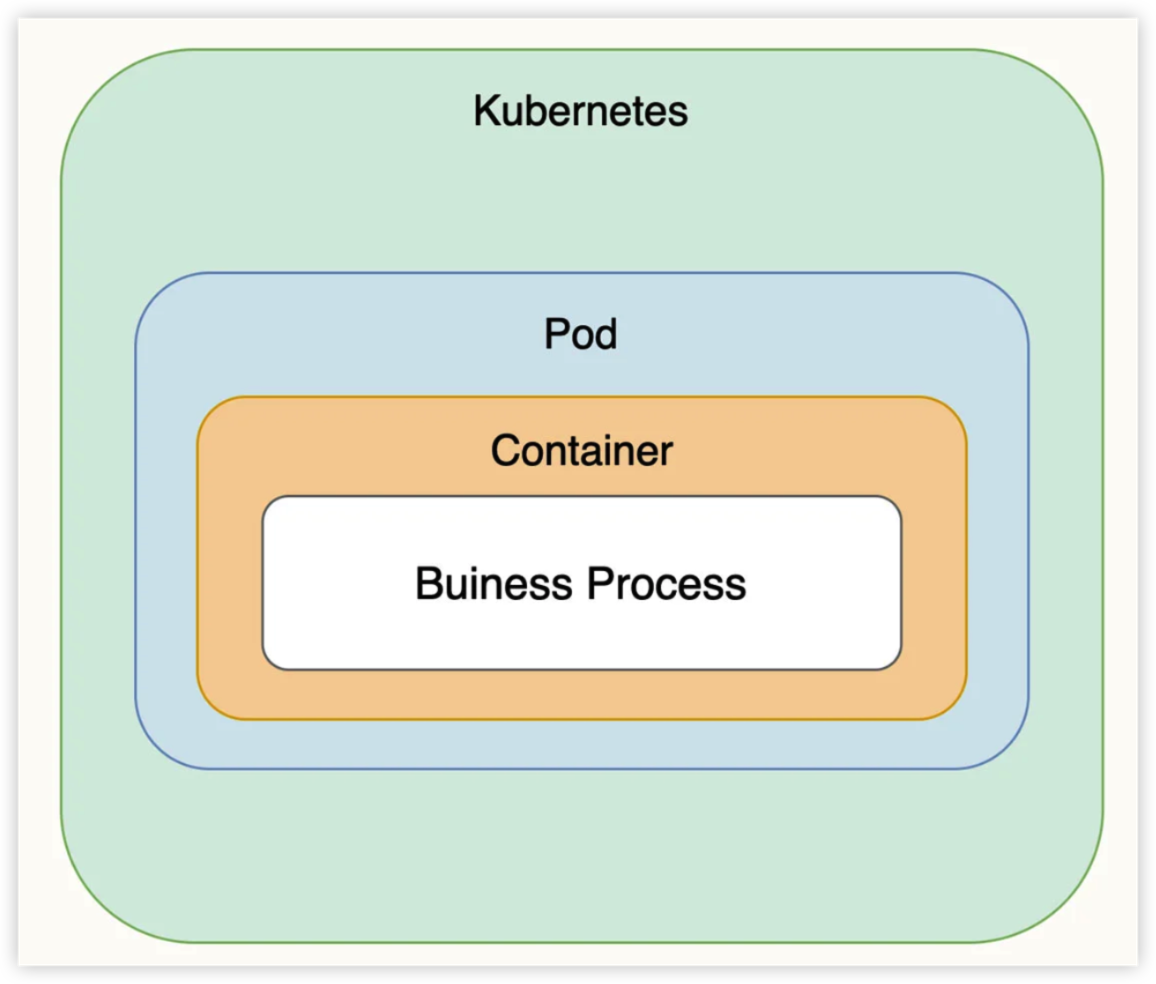
业务进程、容器镜像和工作负载之间的关系
通过这张图可以看出,最内层是我们的业务应用进程,外层通过 Docker 镜像以容器化的形式运行,再往外是 K8s 的最小调度单位 Pod。